Flaky tests in Playwright. Named, fixed, and quarantined.
Flaky Playwright suites are not random. They follow patterns: auto-wait racing re-renders, route handlers too late, networkidle that lies, locator strict-mode surprises, headed-vs-headless drift. Name them, fix them, quarantine what is left. Your CI stays green.
By Rémy Duthu, Software Engineer, CI Insights
· Published
Example PR comment from the Mergify bot detecting a flaky Playwright test and quarantining it automatically.
Why Playwright is uniquely flaky
Playwright's killer feature is actionability auto-waiting: every interaction waits for the target element to be visible, stable, enabled, and receiving events before firing. That removes most of the explicit-sleep flakes that plagued Selenium and Cypress. It also creates a new flake surface, because "actionable" is computed against a real browser whose state is changing while the test runs.
Add the rest of the browser-test stack and the surface grows. Service workers and websockets can keep network idle from ever firing. Routes registered after page.goto miss the initial requests. waitForResponse subscribes too late if you call it after the action that triggered the request. Storage state shared across tests turns into ordering coupling. Tests that pass headed on your laptop fail headless in CI for reasons that come down to viewport size and font rendering.
The patterns are finite. We've seen the same eight on Mergify Test Insights across hundreds of Playwright suites: auto-wait racing element re-renders, route handlers registered after page.goto, networkidle that never settles in SPAs, waitForResponse subscribed too late, locator strict-mode violations, storageState leakage across tests, test.use() scope confusion, and headed vs headless drift. Each has a clean fix once you can name it.
The 8 patterns behind most flaky suites
Pattern 1
Auto-wait racing a re-render
Symptom. A click intermittently fails with `Element is not attached to the DOM` or `Element is outside of the viewport`, even though the locator matched a real element a moment ago.
Root cause. Playwright's actionability checks wait for an element to be visible, stable, and receiving events. The check runs once and the action fires. If your component re-renders mid-flight (a state update lands, a CSS transition completes, a parent unmounts and remounts), the element your locator resolved is replaced before the click reaches it.
// Component swaps between <button> and <button class="loading"> on every fetchawait page.getByRole("button", { name: "Save" }).click();await page.getByRole("button", { name: "Save" }).click();// Second click can race a re-render and fail with "not attached"
Fix. Use locators that survive re-renders (data-testid on the wrapping element, role + name combinations stable across loading states), and chain .waitFor({ state: "visible" }) when you know a re-render is incoming. For animation-driven re-renders, disable the animation in the test environment.
// Stable target that doesn't get swapped:const saveButton = page.getByTestId("invoice-save");await saveButton.click();await saveButton.waitFor({ state: "visible" });await saveButton.click();
With Mergify. Test Insights reruns the suspect test on a dedicated worker. When the failure only repros under the original schedule, the test is tagged as actionability-sensitive and quarantined while you stabilize the locator.
Pattern 2
route() registered after goto()
Symptom. Your test expects a mocked API response but sometimes gets the real one. The mock is registered but the initial page load already fired.
Root cause.page.route() registers an interceptor for future requests. When you call it after page.goto, the page has already started fetching, and any request that beat the registration goes to the real network. Most of the time the mock fires for the next interaction and the test passes; occasionally a slower CI runner means the initial request also waits, the mock catches it, and the test passes for the wrong reason.
await page.goto("/dashboard");// Page already fetched /api/user. Mock too late for the initial load.await page.route("**/api/user", (route) => route.fulfill({ json: { name: "Test User" } }),);await expect(page.getByText("Test User")).toBeVisible();
Fix. Register every route before page.goto. If the mock applies to the whole suite, register it in a fixture that runs before navigation.
With Mergify. Test Insights flags tests that pass with one ordering and fail with another. When the failure only happens when network is slower than usual on the CI runner, the dashboard surfaces the network-dependent flake distinctly from a logic bug.
Pattern 3
networkidle that never settles
Symptom. `page.waitForLoadState("networkidle")` hangs until the test timeout, or settles fleetingly and the next assertion races whatever just resumed.
Root cause.networkidle waits for 500ms with no in-flight requests. Single-page apps with analytics beacons, polling, or websockets never reach 500ms of true silence. The wait either times out or briefly catches the gap between two analytics calls and continues against a half-loaded page.
await page.goto("/dashboard");await page.waitForLoadState("networkidle"); // hangs because of analytics polling
Fix. Wait for the specific signal you care about. expect(locator).toBeVisible() for UI signals, page.waitForResponse for a specific API call, or a custom page.waitForFunction that polls your app's own ready signal.
With Mergify. Test Insights catches the networkidle-timeout signature: timeouts on the same line across many tests in the same file. The dashboard surfaces these as one pattern rather than dozens of independent timeouts.
Pattern 4
waitForResponse subscribed too late
Symptom. A test passes locally and intermittently fails in CI with `Timeout while waiting for response` even though the network tab shows the response did arrive.
Root cause.page.waitForResponse subscribes when called. If you fire the action that triggers the request first and call waitForResponse after, a fast response can arrive before the subscription is set up. Local runs are slow enough that you usually win the race; CI is fast enough that you sometimes lose it.
await page.getByRole("button", { name: "Submit" }).click();const response = await page.waitForResponse("**/api/submit");// On fast CI, the response arrives during the click handler;// waitForResponse subscribes too late and times out.
Fix. Subscribe before triggering. Use Promise.all so the wait is in flight when the action fires.
With Mergify. Test Insights groups timeout signatures by stack trace. When the same waitForResponse line trips across many tests in CI but never locally, the dashboard surfaces it as a CI-speed flake and points at the subscribe-after-action pattern.
Pattern 5
Locator strict-mode violations
Symptom. A test passed for weeks, then started failing with `strict mode violation: locator resolved to N elements` after an unrelated UI change.
Root cause. Playwright locators are strict by default: an action on a locator that matches more than one element throws. Most tests are written when the page has exactly one match. A new dialog, a duplicated nav, or a side panel that reuses the same role can introduce a second match silently. The test code did not change, but the page did.
// Used to be the only "Save" button on the pageawait page.getByRole("button", { name: "Save" }).click();// New autosave indicator added the same accessible name// → strict mode violation: locator resolved to 2 elements
Fix. Anchor the locator with a containing region or a stable test ID. page.getByRole("dialog").getByRole("button", { name: "Save" }) is strict against the dialog, not the page.
With Mergify. Test Insights links the failure to the recent commit that introduced the second match. The dashboard surfaces strict-mode violations distinctly so you know it's a locator-scope issue, not a behavior change.
Pattern 6
storageState leakage across tests
Symptom. A test that depends on being logged in passes on the first run and fails on the next, or fails in CI on the second of two retries against the cached state file.
Root cause.storageState only mutates the on-disk file when something explicitly writes to it via context.storageState({ path }). The trap is the auth setup pattern: a setup project writes auth.json, every other test loads it via test.use({ storageState: "auth.json" }), and a single test that re-saves the file after logging out poisons the shared state for every subsequent run that reuses the cached file.
Fix. Treat the shared storage file as immutable. If a test needs to capture state, write it to a per-test path (test.info().outputPath()) instead of the auth file. Tests that mutate storage (logout, role swap) should run in a fresh context they create themselves, not one seeded from the shared state.
With Mergify. Test Insights detects the cross-test signature: a test that only fails when run after a specific other test. The dashboard tags the dependency so you know storage-state leakage is the cause.
Pattern 7
test.use() scope confusion
Symptom. A fixture override unexpectedly starts affecting other tests in the same file or describe block, or your `viewport` change does not apply to the single test you wrote it on.
Root cause.test.use() applies for the file or describe block where it's called, not the next test. Putting test.use({ viewport: ... }) at the top of a file changes the viewport for every test in the file, even ones you forgot were in there. Inside a describe, the override applies to every test in the describe.
// at the top of suite.spec.tstest.use({ viewport: { width: 320, height: 568 } });test("mobile nav opens", async ({ page }) => { /* ... */ });// 200 lines later, an unrelated desktop test inherits the mobile viewporttest("desktop sidebar collapses", async ({ page }) => { /* fails */ });
Fix. Scope test.use() to the smallest describe block that needs the override, not the file. For a single test, pass the option inline via the fixture override pattern.
With Mergify. Scope confusion shows up in Test Insights as a consistent failure for a specific subset of tests in the same file. The dashboard surfaces the file-level pattern so you can find the misplaced test.use() quickly.
Pattern 8
Headed vs headless drift
Symptom. A test passes when you run it locally with `--headed` and fails in CI on the same commit. Watching the trace doesn't reveal anything obvious.
Root cause. Headed and headless Chromium have small but real behavioral differences: viewport defaults, font rendering (subpixel anti-aliasing), animation timing under throttling, and (until recently) the existence of certain media features. CI usually runs headless with a different default viewport, and a test that depends on a button being above the fold or on a font metric breaks across modes.
// Locally headed: window is 1280x720, button visible without scrollingawait page.getByRole("button", { name: "Confirm" }).click();// CI headless: default viewport differs, button below the fold// → click times out waiting for actionability
Fix. Pin the viewport explicitly in playwright.config.ts so headed and headless run at the same dimensions. Disable animations in test mode (prefers-reduced-motion or a global CSS override) to remove animation-timing as a variable.
With Mergify. Test Insights compares failure rates between local and CI runs of the same SHA. When a test fails only in CI, the dashboard tags it as an environment-dependent flake and points at the headed/headless dimension as a likely cause.
Detection
Catch every Playwright flake in CI
Point Playwright at its built-in JUnit reporter, upload the result to Mergify with a one-line CLI call, and Test Insights builds a confidence score for every test on your default branch. PR runs are compared against that baseline. Anything inconsistent gets flagged in a PR comment before the author merges.
mergify ci
# 1. Enable the JUnit reporter in playwright.config.ts
# reporter: [["junit", { outputFile: "junit.xml" }]]

# 2. Run your tests as usual
npx playwright test

# 3. Upload the result (once, in CI)
curl -sSL https://get.mergify.com/ci | sh
mergify ci junit upload junit.xml
Prevention
Block flaky Playwright tests at PR time
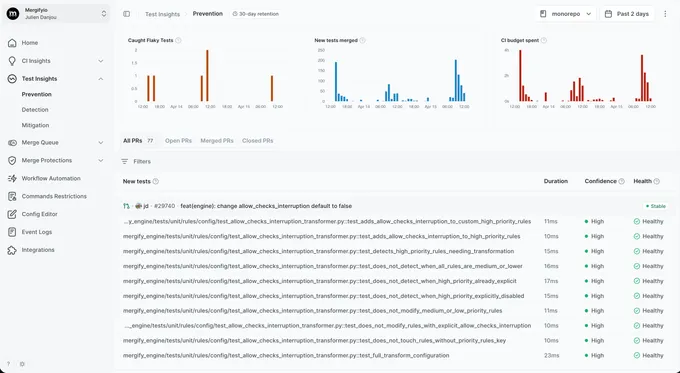
On every PR, Mergify reruns the tests whose confidence is below threshold, without Playwright's `retries` option touching your config. The PR gets a comment naming the unreliable tests, their confidence history, and whether the failure on this PR is new or historical noise. Authors fix the real bugs before merge instead of re-running CI until it passes.
Quarantine
Quarantine without skipping
Once a Playwright test is confirmed flaky, Test Insights quarantines it. The test still runs in the suite, no `test.skip()` rewrite required, but its result no longer blocks merges or marks the pipeline red. When the pass rate on main recovers, quarantine lifts automatically and the test goes back to being load-bearing.
Want to see which Playwright tests in your repo are already flaky?
Works with Playwright's built-in `junit` reporter, no extra plugins required. Setup takes under five minutes.
Why are my Playwright tests flaky in CI but pass locally?
Headed local Chromium and headless CI Chromium differ in viewport defaults, font rendering, and animation timing. Add to that CI's tighter timing budget, which exposes races that hide on a fast laptop. Pin the viewport in playwright.config.ts, disable animations in test mode, and run `npx playwright test --reporter=line --workers=1` locally to approximate CI before pushing.
How do I detect flaky Playwright tests?
Playwright alone cannot tell flaky from broken since each run gives one data point per test. You need to run the same commit multiple times and compare results. Mergify Test Insights does that on every PR and on the default branch, scores each test, and surfaces the tests whose pass rate drops below a confidence threshold.
Does Playwright's `retries` option fix flaky tests?
No, it hides them. A test that fails on attempt 1 and passes on attempt 2 is still broken; you have only decided not to look at the failure. Use Playwright's `retries` option as a temporary bandage for a test you are actively fixing, never as a permanent policy. For visibility without blocking the merge queue, quarantine instead of retry.
What causes flaky tests in Playwright?
Eight patterns cover most of what we see: auto-wait racing element re-renders, route handlers registered after page.goto, networkidle that never settles in SPAs, waitForResponse subscribed too late, locator strict-mode violations, storageState leakage across tests, test.use() scope confusion, and headed vs headless drift. Each is covered above with a minimal reproducer.
How do I quarantine a flaky Playwright test without deleting it?
Mergify Test Insights quarantines the test automatically once its confidence score drops. The test still runs in the suite, but a failing result no longer blocks merges and its noise no longer drowns out real signal. When the test stabilizes on main, quarantine lifts automatically. No `test.skip()`, no commented-out tests, no orphaned files.
Should I use page.waitForTimeout in Playwright?
No, except when debugging. `waitForTimeout(500)` introduces a fixed sleep that turns every test into either a slow test (if you over-wait) or a flaky test (if the thing you were waiting for takes longer than expected). Wait for a specific signal instead: `expect(locator).toBeVisible()`, `page.waitForResponse(url)`, or `page.waitForFunction(predicate)`.
Why Playwright's actionability check can fire on a stale element, the React state-update pattern that triggers it, and the locator strategy that survives the re-render.
Rémy Duthu
Ship your Playwright suite green.
2k+ organizations use Mergify to merge 75k+ pull requests a month without breaking main.